Jan 31, 2026
AI Agents, MCP Tools, and Skills: Toward Smarter Workflows
Why naive MCP usage breaks at scale, how code execution fixes context bloat, and how skills turn agent workflows into reusable building blocks.
When Too Many Tools Become a Problem
Since MCP launched in late 2024, it’s felt like a game changer. To an extent, it still is. But it also comes with a lot of baggage.
Imagine wiring up a full set of MCP servers to an agent client like Claude Code or Cursor: Linear, Figma, GitHub, Slack, Notion (This was my workflow). In practice, that quickly turns into hundreds of tools available to the agent. If your client eagerly loads tool definitions and you pass large tool outputs back through the model, the context window gets eaten up before the model can do much reasoning.
At that point, it becomes clear that scaling is the real problem. As more servers and tools are added, the agent’s context window starts to saturate. Two patterns cause most of the pain.
Tool definitions overload the context.
Most MCP clients load tool definitions up front. Even a single tool definition comes with a description, a parameter schema, and a return type. Multiply that across dozens of APIs and the model is forced to process hundreds of thousands of tokens of boilerplate before it can do any real reasoning.
Intermediate results blow up the conversation.
Now consider a realistic frontend workflow. The agent pulls a Linear ticket to understand requirements, fetches a Figma file to reference the design, checks the backend contract to verify the API shape, and finally uses a GitHub MCP server to implement the UI and open a pull request. In a naive MCP flow, large payloads from each step are passed straight through the model. Design metadata, JSON schemas, API responses, and generated diffs all get injected into the context, often multiple times.
As your app grows and designs become more complex, this repeated data transfer can consume tens of thousands of tokens. The model slows down, context limits get hit, and the agent starts to behave unpredictably.
This becomes an even bigger issue when you expose MCP-powered agentic flows to your own customers. At that point, it’s not just your problem. You are charging users more for a system that gets slower and more brittle as it scales. What starts as a powerful abstraction quickly turns into a tax on both cost and performance.
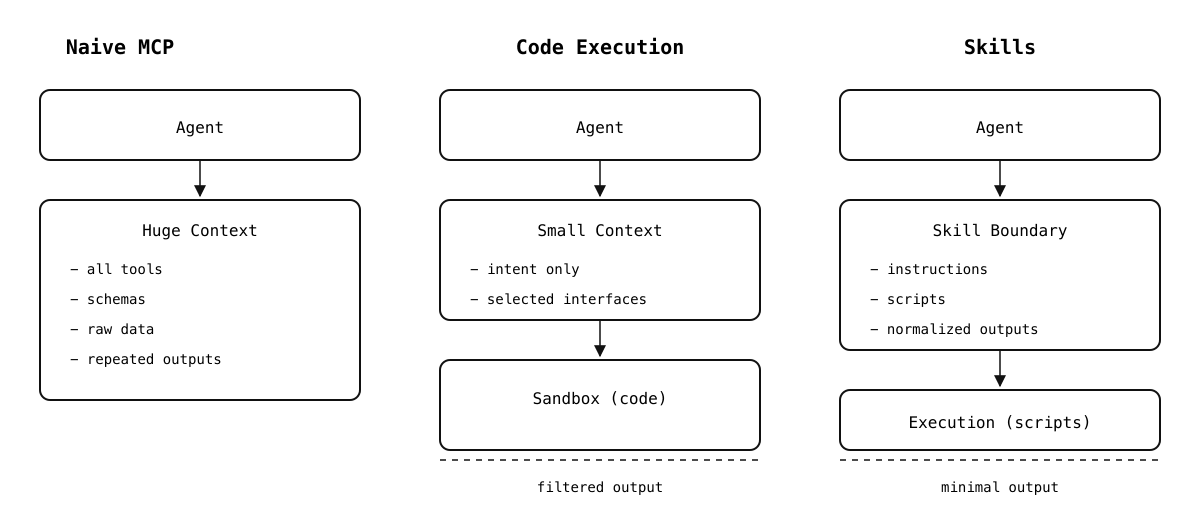
Same task. Three architectures. Very different costs.
Progressive disclosure.
One of the key takeaways from Anthropic’s work here is an implicit admission that the original MCP approach to tool exposure doesn’t scale well. MCP made it easy to connect tools, but it also assumed that agents could safely and efficiently reason over every available capability at once. In practice, that assumption breaks down quickly.
So they introduced a workaround: code execution. Tools are no longer injected wholesale into the model’s context. Instead, they are exposed as files inside a virtual file system that the agent can inspect at runtime.
The agent might start by listing a directory like servers/ to see what integrations are available. From there, it can open a specific file, read a function signature, and import only the methods it actually needs. If it never touches the Figma server, none of those schemas ever enter the context.
This is a meaningful shift in how tools are introduced to agents. Rather than treating tools as static prompt-time metadata, they become runtime dependencies that are loaded on demand. Some implementations also expose a lightweight search_tools API that returns tool names or short descriptions, allowing the agent to decide what to load without pulling in full schemas.
servers/ linear/ issues/ comments/ projects/ figma/ files/ components/ styles/ layouts/ github/ repos/ pull_requests/ issues/ actions/
In effect, Anthropic moved away from “tell the model everything it can do” toward “let the model discover what it needs.” That change alone removes a large amount of unnecessary context pressure and makes agent behavior far more predictable at scale.
This change has a measurable impact on cost and performance. In Anthropic’s example, switching to code execution and filesystem-based discovery reduces token usage from roughly 150,000 tokens to about 2,000 tokens for the same workflow—a 98.7% reduction.
For the full breakdown and numbers, see Anthropic’s engineering post:
Code execution with MCP: Building more efficient agents
Beyond Tools: Agent Skills
Code execution fixes one class of problems with MCP, but it also exposes a deeper issue. Even with better tool discovery and lower token usage, MCP tools are still just capabilities. They tell the agent what it can call, not how those calls should be combined to solve a real task.
This is where skills come in.
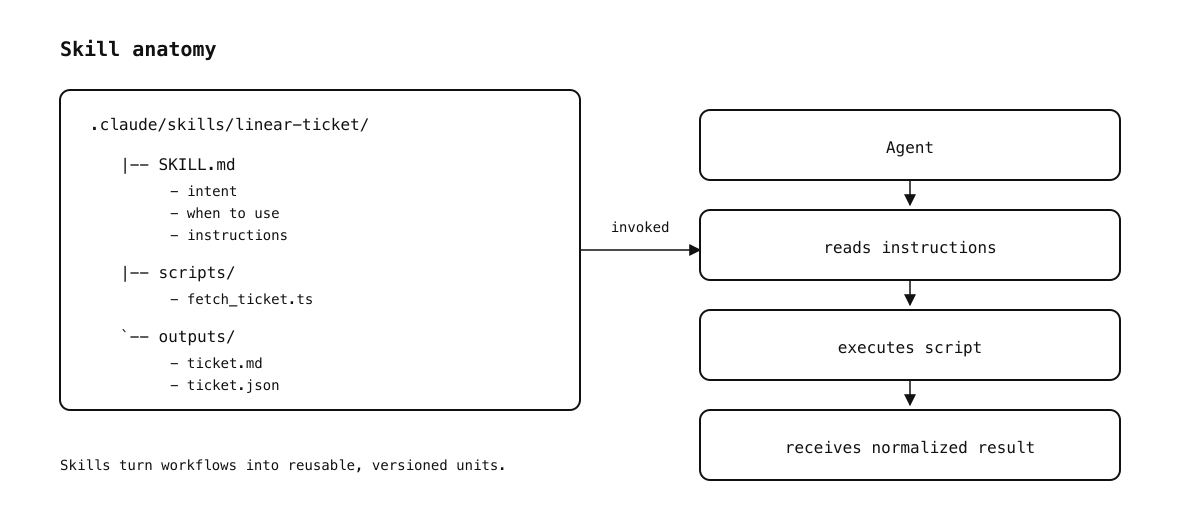
Skills turn workflows into reusable, versioned units.
Skills sit one level above tools. Instead of exposing individual APIs like linear.issue.get or figma.file.fetch, a skill packages domain knowledge, workflow, and reusable logic into something the agent can load and apply as a unit. Both Claude and Cursor support the Agent Skills standard, which treats skills as folders the agent can discover and load on demand.
A skill typically contains a SKILL.md file that describes what the skill does, when to use it, and how the agent should apply it. Optional frontmatter can declare things like compatibility, licensing, and invocation control (for example, disabling automatic model invocation so the skill only runs when you explicitly call it).
This shift matters because it aligns better with how engineers actually work. When I build a UI feature, I don’t think in terms of “call Linear, then call Figma, then call GitHub.” I think in terms of a higher-level workflow: take a ticket, reference the design, verify the API contract, implement the UI, and open a PR. Skills let you encode that pattern once and reuse it consistently.
Skills improve on plain MCP tools in a few important ways.
Portable and version-controlled.
Skills live in your repository or a shared directory and can be checked into version control. They can be installed from GitHub, shared across projects, and reused by any agent that supports the standard. This makes them much easier to evolve and review than ad-hoc prompt logic.
Executable and progressive.
A skill can include scripts, markdown references, or static assets. The agent only loads what it needs at runtime, keeping context usage efficient. Under the hood, this builds directly on the same code-execution model described earlier.
Controlled invocation.
Skills can be auto-loaded based on their description, or gated behind an explicit slash command. This prevents accidental activation and makes skills behave more like intentional tools than background magic.
Stateful workflows.
Because skills can include code, they can orchestrate multi-step flows. A single skill might pull a Linear ticket, extract requirements, fetch a Figma file, verify an API contract, and scaffold a component before handing control back to the agent. This is fundamentally different from chaining individual MCP calls.
Here’s a minimal example of a skill that matches the workflow we’ve been discussing: start from a Linear ticket, fetch it once, normalize it, and persist a compact summary so the agent can plan and implement without repeatedly calling MCP tools.
name: linear-ticket description: Fetch and normalize a Linear ticket into a compact format for planning and implementation disable-model-invocation: true # Linear Ticket ## When to Use - Use this skill when work starts from a Linear ticket. - Use it before planning, implementation, or review. ## Inputs - ticket_id (required) ## Instructions 1. Run the `scripts/fetch_ticket` script with `ticket_id`. 2. Read the generated normalized output file. 3. Use the summary and acceptance criteria for downstream steps. 4. Do not paste raw tool output into the conversation unless explicitly needed.
When this lives in .claude/skills/linear-ticket/, it becomes available as a slash command like /linear-ticket TICKET-123. With disable-model-invocation: true, it’s only loaded when explicitly invoked. Skills can be scoped globally or per project, and Cursor will also discover compatible skill directories at startup.
Skills are a clear step forward from raw MCP tools. They reduce repetition, encode best practices, and let agents operate at the level of workflows instead of individual API calls. They are not the final answer, but they move agent design much closer to how real engineering work actually happens.
Pros and Cons of Skills
Skills solve many problems with MCP tools. Instead of repeatedly injecting tool definitions, you provide a concise description and a reusable workflow. Instead of copying huge intermediate results into the context, you push the heavy lifting into code execution and return only what matters. Over time, this gives agents a library of predictable building blocks.
There are limitations.
- Skills still rely on a secure execution environment and proper sandboxing for any scripts they run.
- Writing good skills is non-trivial. Poorly scoped skills can overlap, conflict, or produce inconsistent behavior.
- Automatic invocation can misfire. In practice, explicit invocation via slash commands is often safer for workflows that can cause side effects.
- Skills need versioning and testing. As your skill library grows, maintaining compatibility across agents and projects becomes its own maintenance surface.
Cursor Got Skills Too
Cursor added support for Agent Skills as well, following the same open standard (and even supporting Claude- and Codex-compatible skill directories).
Cursor loads skills from .cursor/skills/ (plus compatibility directories like .claude/skills/ and .codex/skills/) and discovers them at startup. Each skill lives in its own folder and includes a SKILL.md file with YAML frontmatter and instructions. Similar to Claude Code, skills can bundle executable code, references, and static assets using directories like scripts/, references/, or assets/.
In practice, I’ve found skills in Cursor are easiest to treat as explicit, project-scoped helpers you invoke intentionally, especially for workflows with side effects.
Still, this is an important step. It signals that Cursor is moving beyond “tools + prompts” toward structured, reusable agent behavior.
For details on Cursor’s implementation, see the official documentation:
Agent Skills | Cursor Docs
Claude Marketplace: Finding and Sharing Skills
Anthropic has introduced Claude Marketplace, a community-driven directory where developers can share and discover skills, and plugin marketplaces for Claude Code. Instead of every team reinventing the same workflows, the marketplace acts as a place to browse what others have already packaged up and validated.
One example is Claude Code Marketplaces, an independent, community-run directory that catalogs Claude Code plug-in marketplaces discovered from public GitHub repositories. It’s not an official Anthropic property, but it’s a useful signal of where things are heading: reusable, installable extensions and workflows that feel closer to packages than prompts.
Closing Thoughts
MCP made it easy to connect agents to real systems. That alone was a meaningful step forward. But at scale, the model of dumping tools and data into a context window quickly turns into a cost and reliability problem.
Code execution is the first real correction. Instead of forcing the model to reason over everything, agents can discover tools incrementally and push heavy data and control flow into a runtime where it belongs.
Skills take that idea further. They let you encode a workflow once, review it, version it, and reuse it across runs and projects. Instead of teaching an agent how to behave every time, you give it a structured way to operate.
If you want agentic systems you can trust in production, the answer isn’t more prompts. It’s clearer boundaries, sharper abstractions, and workflows that look more like software than conversations.